B-Bot · Local kids assistant

B-BOT V1
A microphone-ready chat companion that runs entirely on your hardware. B-Bot remembers your kids, respects privacy, and can be started or stopped with a single script.
Voice-first interface
Fast microphone capture, ambient UI, and spoken replies tuned for comprehension.
Guardrails for parents
Admin-only deletion code, editable memory, and clear review of every conversation.
Offline after setup
Dockerized stack that stays on-device. Run it locally, keep every note.
The brief
Built for two curious boys (and their mom)
The B-Bot brief was straightforward: keep the fun parts of AI—voices, memory, persistence—but remove the surveillance surface. This kit ships with the same controls, configuration, and structure we run in-house.
Voice chat
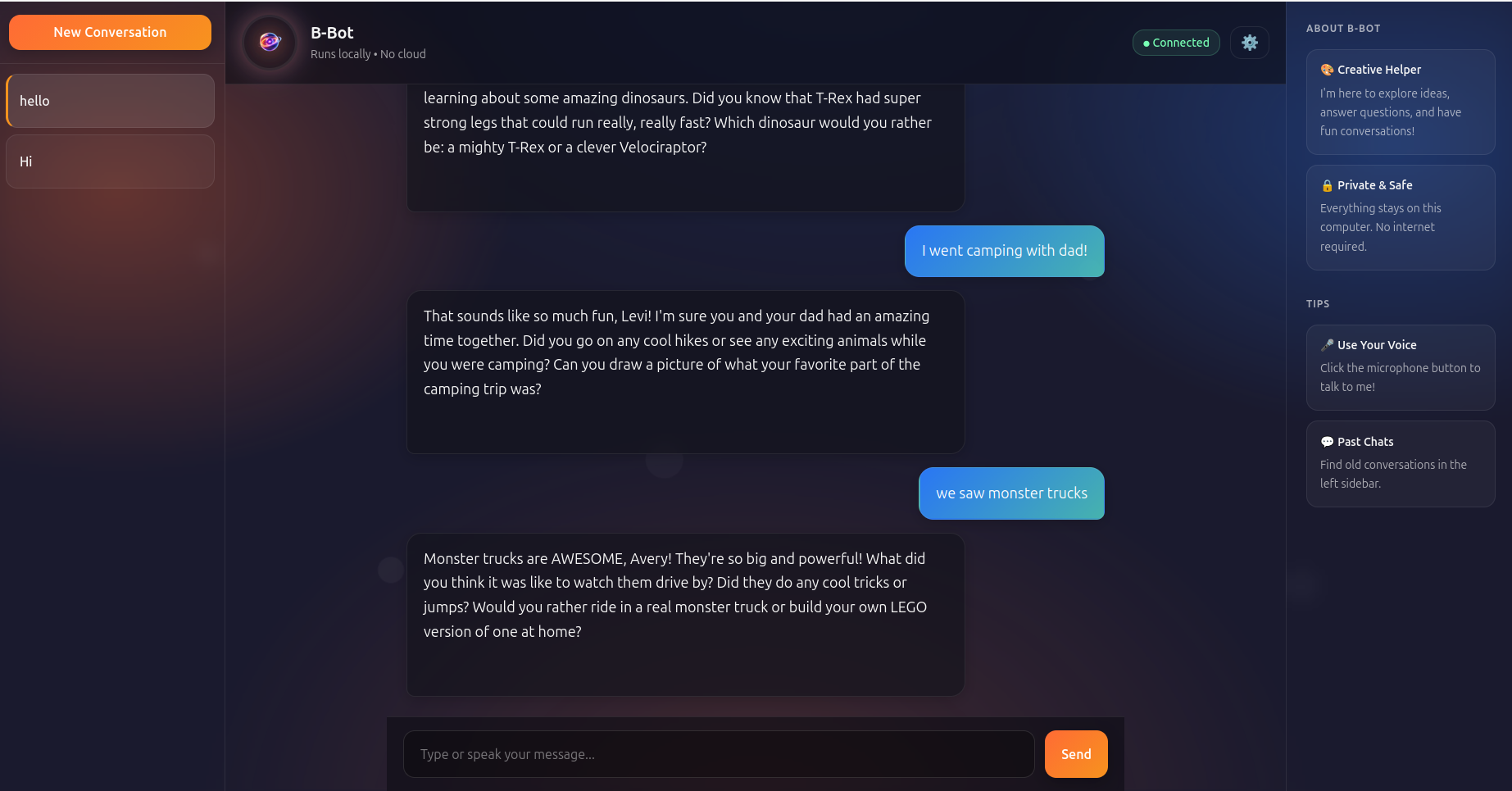
Click-to-record microphone control. B-Bot listens, sends, and speaks back immediately.
Persistent memory
Editable `memory.json` keeps names, interests, and achievements so context stays human.
Conversation history
Every session is saved in `data/conversations.db` and listed in the sidebar for review.
Parent override
Protected delete flow with an admin-only code so only adults can clear chats.
Quick start
From download to playing in about 10 minutes
01Prepare your machine
Install Docker Desktop (Mac/Windows) or Docker Engine (Linux). Make sure the daemon is running—the whale icon in the tray should be happy.
02Receive your kit
After payment the full archive shows up in your inbox with scripts plus `/config`, `/data`, `/gateway`, `/ui`, and `/voices`.
03Start B-Bot
On Windows run `start-bbot.bat`. On macOS/Linux run `./start-bbot.sh`. The first boot downloads the model (~5–10 minutes). Afterwards it's seconds.
04Visit the UI
Open http://localhost:8768. Create a new conversation and start talking. The microphone button glows red when it is listening.
Daily use
How the family uses it
Kids
- Type or talk—B-Bot handles both.
- Start new chats whenever they want a clean slate.
- Ask about dinosaurs, math, bedtime stories. It remembers what they care about.
Parents
- Review every conversation in the left sidebar.
- Delete chats only after entering the admin code.
- Edit `memory.json` to reinforce interests or family details, then restart.
What's inside
The bundle installed on your machine
Scripts
`start-bbot.(sh|bat)` and `stop-bbot.(sh|bat)` control the Docker compose stack.
Config
`personality.json`, `memory.json`, and `system_prompt.txt`—all editable with a restart.
Gateway
Voice handler and core gateway code that talks to the local model via HTTP.
UI
Enhanced chat experience with ambient lighting, voice controls, and sidebar history.
Data
SQLite database for conversations plus the `voices/` directory for playback assets.
Docs
README, shortcut tips, and a deployment guide to keep everything predictable.
Safety + support
No cloud dependencies. Transparent controls.
Once the model image is cached, B-Bot runs offline. You control the memory file, the prompts, and the shutdown scripts. If you want to extend it—multi-user memory, bilingual voices, deeper audit logs—just reach out.
Get a kit
Invoice before the ZIP ships.
Each B-Bot package is licensed per household. Tell us who it’s for and we’ll send an invoice link (Stripe or manual ACH). Once it’s paid, the archive and onboarding call details arrive immediately.